





I started looking at Xoom as the sort of finance app people install for a practical reason rather than casual browsing: someone in the household needs to send money abroad, receive help from family, or pay for an expense in another country. That focus makes it easier to judge. It is not trying to be a general budgeting dashboard or a shared family wallet. It is a money-transfer service from Xoom, a PayPal Service, built around international transfers and related payment needs.
In everyday use, I find the strongest case for it is a household with relatives in different countries. One person may handle the transfer, another may need to confirm the recipient’s details, and everyone may want a clear understanding of who is responsible for the transaction. Xoom can fit that arrangement well, but only when people respect the boundary between coordinating a payment and sharing control of a financial account. Convenience is useful here, but clear account ownership matters more.
How Xoom fits a shared household money routine
A realistic example is a parent living in the United States who regularly sends money to a relative in Mexico, while an adult child helps check the recipient information before the transfer is made. The parent can use the app for the actual transaction, and the child can assist with practical details without needing to sign in as the account owner. That separation is healthier than passing one device around with a financial session left open.
I would also use this kind of arrangement when a household member is less comfortable with mobile finance. A trusted relative can sit beside them, explain each screen, and help compare the recipient’s name, destination, and amount before anything is submitted. The person who owns the account should still make the final decision. That small habit reduces the risk of sending money to the wrong person because somebody rushed through a familiar-looking screen.
The app’s international focus is broad. Its store summary presents transfers to Mexico, India, and many other destinations, covering 145 countries in total. That makes it more useful than a service limited to one corridor, especially for households whose relatives are spread across different parts of the world. Still, broad availability does not mean every destination works in exactly the same way, so I would check the available delivery method and final cost for the specific country before treating Xoom as the default.
For a shared device, I prefer a simple rule: one person owns the account, and other household members provide assistance without taking over the login. This is particularly important if the phone is used by teenagers, guests, or several adults. The app is suitable for coordinating a transfer, but it should not be treated like a communal notes app where everyone can freely open, edit, or reuse the same financial session.
What setup feels comfortable, and what should stay private
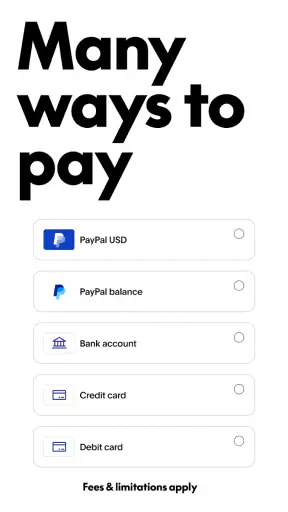
Getting started is most comfortable when the account holder has their own email, phone access, and payment information ready. I would avoid creating an account while distracted, especially if another family member is waiting for the transfer. Financial apps reward slow setup: read the recipient’s details, check the destination, and make sure the funding method belongs to the person who is actually authorizing the payment.
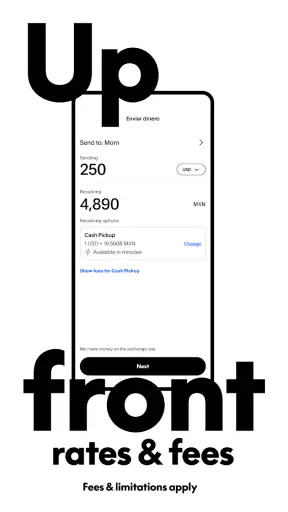
Xoom is free to install, but that should not be confused with every transfer being free. International money services can involve exchange-rate differences, transfer charges, or delivery-specific costs, and the important number is the final amount shown before confirmation. I make a habit of checking both what I pay and what the recipient is expected to receive. That is more informative than judging a service only by its download price.
The app is rated for Everyone, which describes its general content suitability rather than granting every age group independent authority to move money. I would not interpret that label as a reason to hand the account to a child. A younger household member may be able to help read instructions or translate a screen, but the adult account holder should remain responsible for authentication, payment choices, and recipient verification.
One useful household workflow is to prepare the information outside the final confirmation step. I would ask the recipient to send their details through a trusted channel, then compare them character by character when entering them. If someone else is helping, I would have that person read the details aloud while the account holder checks the app. This two-person check is especially worthwhile for names that are easy to misspell or destinations where a small error could delay delivery.
Another practical boundary is device switching. If I need help from someone using another phone, I would explain the transfer rather than immediately giving away account credentials. A shared household does not need a shared login. Keeping the account tied to its owner makes it easier to know who authorized a payment and reduces confusion when several people remember the same transaction differently.
Coordinating transfers without turning the account into a group project
Xoom works best when the household agrees on a small process before opening it. First, decide who is sending the money. Next, confirm the recipient and purpose. Then, check the amount and delivery details together. Finally, let the account holder approve the transaction. This sounds basic, but it prevents the common problem where one person assumes another person already checked the details.
I also like separating conversation from approval. Family members can discuss timing and amount in a group chat or in person, but the final review should happen inside the app with the sender present. That gives everyone a shared understanding without making the app itself a place where multiple people casually operate the same account.
For recurring support, keeping a simple household record can help. I would note the date, recipient, purpose, and amount in a private place after the transfer, without storing passwords or full payment details. This is not a replacement for the app’s transaction information; it is a coordination tool that helps answer ordinary questions such as whether this month’s support was already sent or whether a relative is asking about a different payment.
A less obvious advantage of this approach is that it reduces emotional pressure. International transfers often happen during family emergencies or urgent requests. When someone says the money must be sent immediately, a second person can still check the recipient and destination without blocking the transfer unnecessarily. The goal is not bureaucracy. It is a quick pause that protects the sender from acting on a mistaken message or an impersonation attempt.
That caution also explains when I would choose something else. If the household needs a full shared spending account, joint budgeting, bill splitting, or automatic expense categories, Xoom is not the right central tool. A bank account designed for joint use or a dedicated budgeting service would be better for those jobs. Xoom is more focused: it handles the act of sending money internationally rather than organizing an entire family’s finances.
Trust, age, and the limits of a friendly interface
The app’s approachable presentation can make international transfers feel straightforward, but the underlying decision is still serious. I would be comfortable helping an older relative navigate the process, provided the relative understands the recipient and authorizes the payment. I would be much less comfortable letting a child or an unfamiliar helper enter payment information or approve a transfer simply because they are more confident with smartphones.
Trust should be specific, not assumed. Someone may be trustworthy enough to explain a screen but not trustworthy enough to handle account access. Someone may know the recipient personally but still enter an incorrect detail. In my view, the safest household arrangement gives helpers the smallest role they need: reading, translating, or checking—not controlling the transaction.
The app has been available since 2012, and its current version is 10.11.0. That history and ongoing versioning suggest a service intended for regular use rather than a one-off experimental tool, but they do not remove the need to review each transfer. Familiarity can create its own risk. After sending money several times, people tend to tap through quickly, even when the recipient, amount, or destination has changed.
For older phones or devices shared by several people, I would pay attention to practical housekeeping. Keep the operating system supported by the device, install updates from the official app marketplace, and lock the phone when it is not in use. These are broader phone habits, but they matter more when a finance app is present. A household should not rely on the app alone to compensate for an unlocked or frequently borrowed device.
I would also avoid using a public or borrowed phone for a transfer whenever possible. If circumstances make that unavoidable, I would be careful about account sign-in, payment details, and leaving the session behind. The most convenient device is not always the safest one, particularly when several people use it or when its owner is not someone I know well.
How it compares with banks, wallets, and other transfer choices
Compared with sending money through a traditional bank, Xoom can feel more direct for people whose main need is an international transfer rather than a broader banking relationship. A bank may be preferable when the sender already manages everything there, wants account-to-account records in one place, or needs services beyond remittances. Xoom becomes more attractive when the transfer itself is the priority and the destination is supported.
Compared with a general digital wallet, the distinction is its international purpose. A wallet may be excellent for domestic purchases, peer-to-peer payments, or holding a balance, while Xoom is aimed at moving money across borders. I would compare the final recipient amount, delivery route, and convenience instead of assuming that the most familiar wallet is automatically the cheapest or easiest option.
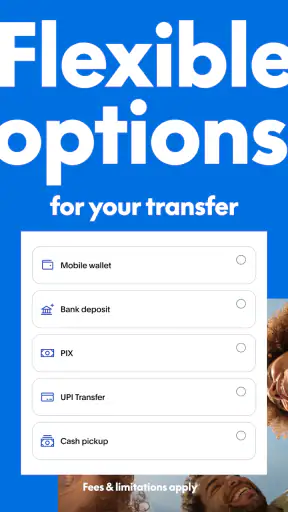
Cash-based remittance services can still make sense for recipients who prefer collecting money in person or who have limited access to banking. Xoom may be a better fit when its available delivery choices match the recipient’s situation and the sender wants to arrange the transfer from a phone. The right choice depends on what the recipient can actually use, not simply on which app has the cleanest interface.
One trade-off I would not ignore is cost transparency. The headline amount sent is only part of the decision. I want to see the total charged, the exchange rate applied, and the amount expected by the recipient before confirming. If another service gives a better final result for the same destination and timing, I would use that service instead. Loyalty is less important than knowing what the family member will receive.
Another trade-off is flexibility versus routine. A multi-country service is convenient for a household with changing destinations, but a specialist service focused on one corridor may sometimes offer a more tailored experience. Xoom’s broad reach is useful, yet I would still compare it when sending large or frequent amounts. For small, occasional family support, ease of use may reasonably outweigh a minor difference; for repeated transfers, the numbers deserve closer attention.
What I would check before pressing confirm
My personal checklist is short but deliberate. I confirm the recipient’s identity, destination country, amount, delivery method, and expected receive amount. I also check whether the funding source is the correct one, especially on a household device where more than one person may have financial information stored or accessible.
I would not let urgency erase the review. If a message says a relative suddenly needs money, I would verify the request through a separate contact method before sending anything. This is one of the most important non-obvious uses of a transfer app: its speed can help a genuine emergency, but the same speed can make a fraudulent request more damaging.
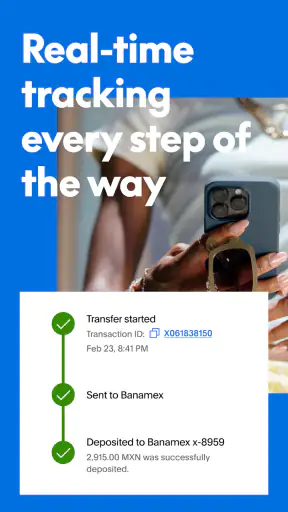
After submission, I would keep the confirmation information available to the sender and communicate the expected next step to the recipient. The recipient does not need the account password, and a helper does not need permanent access just because they assisted once. Good coordination ends with everyone knowing what happened, while private credentials remain private.
For a first transfer, I would start with an amount that is appropriate for testing the process rather than immediately sending the maximum amount needed. This lets the household learn how the recipient receives funds and whether the chosen delivery method fits their circumstances. It is a sensible way to discover practical friction without turning a setup mistake into a major problem.
The app’s scale is reassuring to some users: it has more than five million installs, an average rating of 4.8, and around 363 thousand ratings. I see those figures as evidence that many people find the service useful, not as a guarantee that every transfer will be effortless. International payments depend on the route, recipient details, funding source, and timing, so individual care still matters.
It is also worth remembering that the number of written reviews is around 30 thousand, which gives prospective users plenty of public feedback to browse. I would read recent comments with a specific question in mind—how people describe their destination and delivery experience—rather than treating a general rating as a substitute for checking the details of my own transfer.
My household verdict on Xoom
After considering it as a shared-household finance tool, I see Xoom as a good choice for one clearly defined job: sending money internationally while keeping the actual account and approval with one responsible person. It is especially useful for families supporting relatives abroad, people who need several destination countries, and users who prefer arranging transfers from a mobile device instead of visiting a physical location.
I would recommend it to a friend who wants a focused remittance app and is willing to compare the final cost before confirming. I would also recommend setting the household rules first: do not share the login casually, verify urgent requests independently, and use a second person as a checker rather than as an account operator. Those habits make the app safer and easier to understand without pretending that a finance service can replace judgment.
I would skip it as the main household finance solution if the real need is joint banking, shared budgeting, domestic bill management, or a transparent family spending ledger. I would also look at alternatives when a recipient’s preferred delivery method is not supported or when another provider offers a clearly better final amount for the same route. Xoom’s convenience is valuable, but it should earn its place on each transfer.
For me, the final impression is positive but practical. The free Finance app from Xoom, a PayPal Service, has the reach and focused purpose to make international family support less awkward. Its Everyone age rating makes it broadly approachable, while the financial responsibility still belongs with the adult who owns and authorizes the account. Used with that boundary in place, Xoom: Send Money & Transfer is a sensible household option—not because it removes every complication, but because it puts the transfer process in a form that families can coordinate carefully.


